> ## Documentation Index
> Fetch the complete documentation index at: https://docs.vinmake.com/llms.txt
> Use this file to discover all available pages before exploring further.
# Working the exception register
> The checks run every night whether you ask or not. This is what they leave behind: how to run one on demand, read a finding, acknowledge it, waive it with a reason and an expiry, and close the task it opened.
# Working the exception register
[Asking the Auditor](/greatbook/guides/audit-your-books) is the conversation.
This is the other half: the checks run **every night** whether anyone asks or not, and what they find waits for you in one place.
Open **Audit** in the left rail.
**The one sentence that explains the whole screen.**
An exception is not a message you dismiss.
It is a row that stays until the book changes, and every night it is still wrong it gets one day older.
The page says it in its own words at the top: *"One row per exception, not per sighting."*
## What you are looking at
The Audit desk has five tabs.
| Tab | What it holds |
| -------------- | --------------------------------------------------------------------------------------------------------------- |
| **Exceptions** | the register: one row per problem, with its severity, its lane, its age and its state |
| **Checks** | the generated control inventory: what is covered, when it runs, and which lane owns a failure; not a run result |
| **Sweeps** | what is scheduled, what each job covers, when it last ran, and what a run could **not** cover |
| **Actions** | the human worklist, in two lanes. It is distinct from the top-level Actions agent-run inbox |
| **Chat** | the Auditor itself, for asking rather than reading |
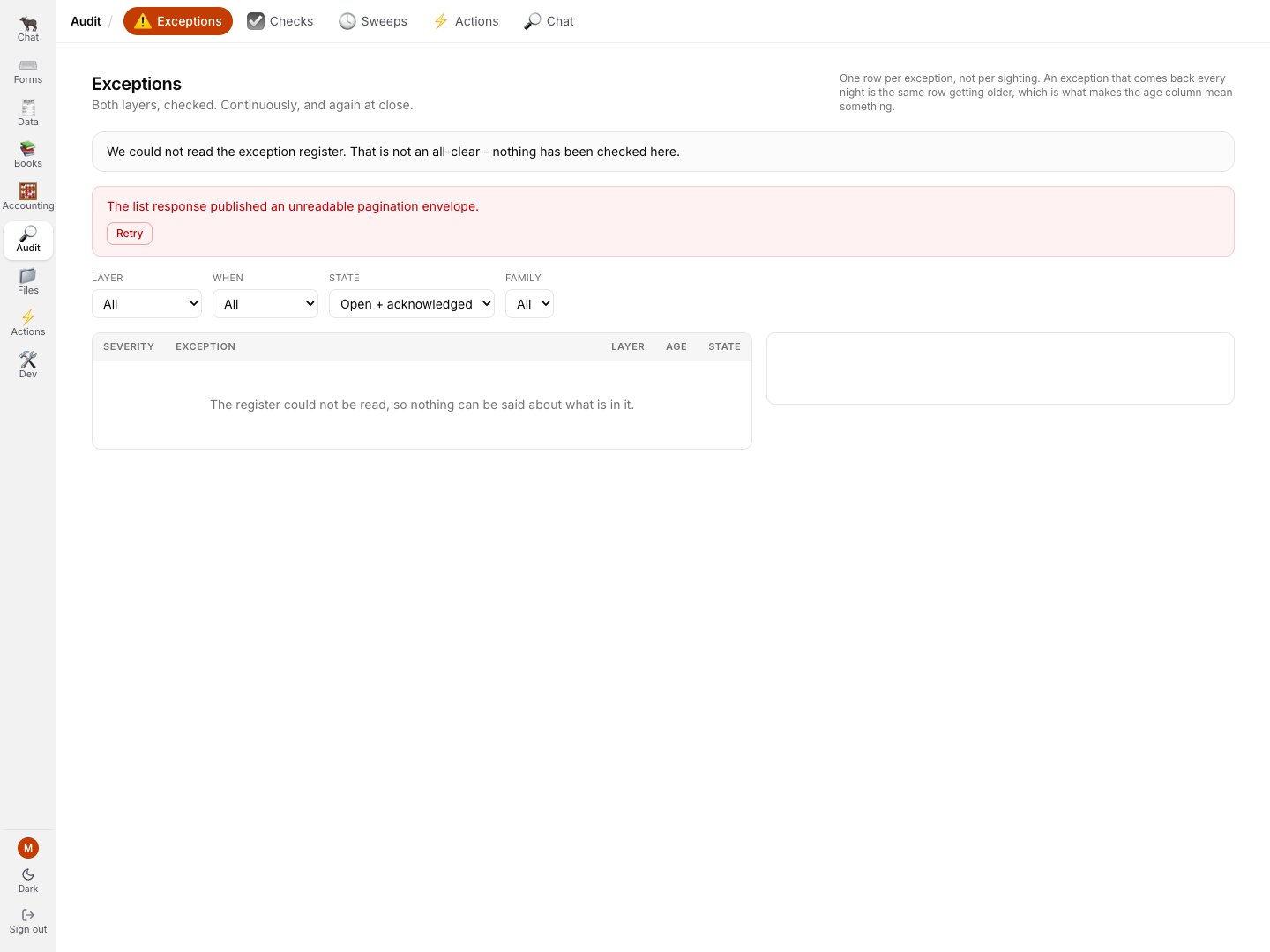 The header keeps the visible exception count and the waived count separate.
A waived control never disappears quietly from a claim; when none are waived, the page says that nothing is currently silenced.
The four filter facets are the four questions worth asking of a register.
| Facet | Values | Why it is a facet |
| ---------- | --------------------------------------------------------------------------- | --------------------------------------------------------------------------------------------------------------------------- |
| **Layer** | Bookkeeping · Accounting | whether the book's problem is documents that do not tie or lines that are not attributed. Two different people's afternoons |
| **When** | Continuous · Close-gated · Not stated | a close-gated check that has not run mid-period is *out of season*, not unknown |
| **State** | Open + acknowledged · Open · Acknowledged · Waived · Resolved · Every state | the default is open + acknowledged, which is what "is anything wrong?" means |
| **Family** | only the families that actually have rows | so an empty family is not a filter you can waste a click on |
**Audit → Actions** carries the subset a person can act on, split into the **bookkeeping** lane (find the missing or wrong document) and the **accounting** lane (decide what this belongs to).
You only need to read your own lane.
## Reading a finding
A row tells you five things, and each one is there because a chat answer could not give it to you.
| What | Why it is a column |
| -------------------------- | ---------------------------------------------------------------------------------------------------------------------------------------------------------- |
| **severity** | `critical`, `error`, `warning`, or `inconclusive`. Note that `inconclusive` is not a mild version of a problem: it means the check **could not run** |
| **age** and **seen count** | severity is banded by age. `first seen 12 Jun · seen 47 times` is one problem 47 days old, not 47 problems |
| **lane** | matching or analysis, so you can tell at a glance whether the book's problem is documents that do not tie or lines that are not attributed |
| **the subject** | the actual document, as a link into the screen that owns it |
| **the honest limit** | where a check could only match on supplier and month rather than on an order reference, that sentence is *in the finding*, not buried in a design document |
Click a row and the panel on the right gives you the whole finding.
Three things in that panel are worth pointing at.
**The message tells you what to do, and what not to.**
*"The entry is immutable, so the remedy is to attach the supporting document, not to correct the posting."*
A finding that named a problem without naming its remedy would send people to the wrong screen.
**"What the check recorded"** is the raw fields the rule keyed on, so you can tell a real exception from a mis-keyed one without reading any code.
**The line under the buttons** is the rule this whole system rests on:
> *"Acknowledging says you have seen it; it stays an open exception. Nothing on this screen can mark an exception resolved - only a sweep that re-reads the book and does not find it again may do that."*
**`inconclusive` is never a pass, and it is never a failure either.**
It means a check could not be run: the reconciliation graph was stale, a configured document pair named a clock nothing measures, the database was unreachable.
Coverage and cleanliness are reported as two separate facts precisely so that "nothing complained" can never be read as "everything was checked".
## Running a check on demand
You do not have to wait for tonight.
**Audit → Sweeps** is both halves: what is scheduled, and what has actually run.
Each job is designed to describe both its scope and its exclusions.
`nightly close continuous` runs the 54 must-be-zero continuous checks plus the 22 reported balances and **does not** run the 26 close-gated ones, which only make sense after a period-end procedure and would false-flag every night.
A job that told you only what it covers would let you assume the rest.
**Known display defect in the current build:** the Sweeps job description still says **52 + 21**, the figures seeded when the inventory was smaller.
The generated **Checks** inventory and current runner declare **56 + 22** continuous definitions, for 78 of 104 total.
Until the seeded job description is migrated, use Checks for inventory and the run detail for what actually executed.
Then read a **run**, not just its verdict.
The two badges are two different facts, and this is the most important habit on the page:
| Badge | Answers |
| ------------------------------------- | ----------------------------------------------------- |
| **nothing wrong** | did any check fail? |
| **everything asked for was verified** | did every check the run was asked for actually *run*? |
A run can be clean and incomplete at the same time.
**What it did NOT verify** is printed as its own section rather than left as an absence, and **what it covered** states the window the run answers for.
A clean verdict over a narrow scope is not a clean book, and the run tells you which one you are looking at.
You can also just ask in chat: *"Run a full check on the books"* runs the six routine families and narrates one line per family.
The seventh, `close_gated`, has a runner but is explicit-only: name it or schedule it for the appropriate close period.
## The three things you can do with a finding
"Seen, and being handled."
Use it so the rest of the team knows somebody has it.
It does not claim the problem is gone, and a re-sighting does not undo it.
"I know, and it is not going to change by {date}."
Needs a reason and an expiry.
The control comes back on by itself.
The only thing that actually makes an exception go away.
Correct the underlying document or posting, and the **next sweep** resolves it.
**There is no "resolve" button, and its absence is deliberate.**
`resolved` means one specific thing: a run that re-read the book did not find this.
Only a sweep can establish that, so only a sweep may write it.
A button that let you mark something resolved would be the product asserting an outcome the database never checked, which is exactly the kind of confident-and-wrong that an assurance tool must never manufacture.
## Waiving, and what it costs you
A waiver is the one judgement in the register, and the dialog opens by telling you so.
> *"You are silencing a control, not clearing an exception. It will be recorded against you by name, with your reason, and it re-opens on the date below."*
It is bounded in four ways.
An agent identity, a placeholder name, and a server-to-server service token are all refused with a 403.
A waiver is a human silencing a control and an unattributable one is worthless.
> *"a service-token caller cannot waive an audit finding: a waiver is a human silencing a control, and there is no human in a server-to-server request"*
Required, and the database refuses a waiver without one rather than trusting the form.
The default is **the end of your fiscal year**, and the dialog says where that comes from: *"read from your own fiscal calendar by the backend, so it is your year end and not a date this screen guessed"*.
You may bring the date forward.
You may not push it past the cap, and if you try you get a refusal that **names the limit** rather than silently moving your date.
When the expiry passes, the next sweep re-opens the finding.
Until then it behaves like an acknowledgement: seeing it again does not undo the waiver.
Who waived it, why, and until when stay on the row afterwards.
**A waiver never hides anything silently.**
Waived findings are excluded from the "is anything wrong?" count, so a waiver genuinely lets a clean claim through.
And every surface that makes such a claim reports the **waived count beside it**.
You will see "clean, with 1 waived exception", never a bare "clean" over a control somebody switched off.
Good reasons to waive: a known upstream defect with a tracked fix, a supplier who genuinely will not issue the document until next month, a check that is correct in general and wrong for one documented case.
Bad reason to waive: the finding is noisy.
If a rule fires on almost everything, the rule is wrong and the fix is the rule.
Filter **State** to *Waived* to see what is currently silenced, and every waived finding carries its own trail.
The panel is headed **"This control is silenced"**, names the person, states the date it re-opens, and quotes the reason they gave.
Note also that the waived view still has **no** Acknowledge or Waive button: there is nothing further to do to it until it comes back.
## Closing an action
An exception that a person can act on opens a **task** in **Audit → Actions**, in its own lane.
The header keeps the visible exception count and the waived count separate.
A waived control never disappears quietly from a claim; when none are waived, the page says that nothing is currently silenced.
The four filter facets are the four questions worth asking of a register.
| Facet | Values | Why it is a facet |
| ---------- | --------------------------------------------------------------------------- | --------------------------------------------------------------------------------------------------------------------------- |
| **Layer** | Bookkeeping · Accounting | whether the book's problem is documents that do not tie or lines that are not attributed. Two different people's afternoons |
| **When** | Continuous · Close-gated · Not stated | a close-gated check that has not run mid-period is *out of season*, not unknown |
| **State** | Open + acknowledged · Open · Acknowledged · Waived · Resolved · Every state | the default is open + acknowledged, which is what "is anything wrong?" means |
| **Family** | only the families that actually have rows | so an empty family is not a filter you can waste a click on |
**Audit → Actions** carries the subset a person can act on, split into the **bookkeeping** lane (find the missing or wrong document) and the **accounting** lane (decide what this belongs to).
You only need to read your own lane.
## Reading a finding
A row tells you five things, and each one is there because a chat answer could not give it to you.
| What | Why it is a column |
| -------------------------- | ---------------------------------------------------------------------------------------------------------------------------------------------------------- |
| **severity** | `critical`, `error`, `warning`, or `inconclusive`. Note that `inconclusive` is not a mild version of a problem: it means the check **could not run** |
| **age** and **seen count** | severity is banded by age. `first seen 12 Jun · seen 47 times` is one problem 47 days old, not 47 problems |
| **lane** | matching or analysis, so you can tell at a glance whether the book's problem is documents that do not tie or lines that are not attributed |
| **the subject** | the actual document, as a link into the screen that owns it |
| **the honest limit** | where a check could only match on supplier and month rather than on an order reference, that sentence is *in the finding*, not buried in a design document |
Click a row and the panel on the right gives you the whole finding.
Three things in that panel are worth pointing at.
**The message tells you what to do, and what not to.**
*"The entry is immutable, so the remedy is to attach the supporting document, not to correct the posting."*
A finding that named a problem without naming its remedy would send people to the wrong screen.
**"What the check recorded"** is the raw fields the rule keyed on, so you can tell a real exception from a mis-keyed one without reading any code.
**The line under the buttons** is the rule this whole system rests on:
> *"Acknowledging says you have seen it; it stays an open exception. Nothing on this screen can mark an exception resolved - only a sweep that re-reads the book and does not find it again may do that."*
**`inconclusive` is never a pass, and it is never a failure either.**
It means a check could not be run: the reconciliation graph was stale, a configured document pair named a clock nothing measures, the database was unreachable.
Coverage and cleanliness are reported as two separate facts precisely so that "nothing complained" can never be read as "everything was checked".
## Running a check on demand
You do not have to wait for tonight.
**Audit → Sweeps** is both halves: what is scheduled, and what has actually run.
Each job is designed to describe both its scope and its exclusions.
`nightly close continuous` runs the 54 must-be-zero continuous checks plus the 22 reported balances and **does not** run the 26 close-gated ones, which only make sense after a period-end procedure and would false-flag every night.
A job that told you only what it covers would let you assume the rest.
**Known display defect in the current build:** the Sweeps job description still says **52 + 21**, the figures seeded when the inventory was smaller.
The generated **Checks** inventory and current runner declare **56 + 22** continuous definitions, for 78 of 104 total.
Until the seeded job description is migrated, use Checks for inventory and the run detail for what actually executed.
Then read a **run**, not just its verdict.
The two badges are two different facts, and this is the most important habit on the page:
| Badge | Answers |
| ------------------------------------- | ----------------------------------------------------- |
| **nothing wrong** | did any check fail? |
| **everything asked for was verified** | did every check the run was asked for actually *run*? |
A run can be clean and incomplete at the same time.
**What it did NOT verify** is printed as its own section rather than left as an absence, and **what it covered** states the window the run answers for.
A clean verdict over a narrow scope is not a clean book, and the run tells you which one you are looking at.
You can also just ask in chat: *"Run a full check on the books"* runs the six routine families and narrates one line per family.
The seventh, `close_gated`, has a runner but is explicit-only: name it or schedule it for the appropriate close period.
## The three things you can do with a finding
"Seen, and being handled."
Use it so the rest of the team knows somebody has it.
It does not claim the problem is gone, and a re-sighting does not undo it.
"I know, and it is not going to change by {date}."
Needs a reason and an expiry.
The control comes back on by itself.
The only thing that actually makes an exception go away.
Correct the underlying document or posting, and the **next sweep** resolves it.
**There is no "resolve" button, and its absence is deliberate.**
`resolved` means one specific thing: a run that re-read the book did not find this.
Only a sweep can establish that, so only a sweep may write it.
A button that let you mark something resolved would be the product asserting an outcome the database never checked, which is exactly the kind of confident-and-wrong that an assurance tool must never manufacture.
## Waiving, and what it costs you
A waiver is the one judgement in the register, and the dialog opens by telling you so.
> *"You are silencing a control, not clearing an exception. It will be recorded against you by name, with your reason, and it re-opens on the date below."*
It is bounded in four ways.
An agent identity, a placeholder name, and a server-to-server service token are all refused with a 403.
A waiver is a human silencing a control and an unattributable one is worthless.
> *"a service-token caller cannot waive an audit finding: a waiver is a human silencing a control, and there is no human in a server-to-server request"*
Required, and the database refuses a waiver without one rather than trusting the form.
The default is **the end of your fiscal year**, and the dialog says where that comes from: *"read from your own fiscal calendar by the backend, so it is your year end and not a date this screen guessed"*.
You may bring the date forward.
You may not push it past the cap, and if you try you get a refusal that **names the limit** rather than silently moving your date.
When the expiry passes, the next sweep re-opens the finding.
Until then it behaves like an acknowledgement: seeing it again does not undo the waiver.
Who waived it, why, and until when stay on the row afterwards.
**A waiver never hides anything silently.**
Waived findings are excluded from the "is anything wrong?" count, so a waiver genuinely lets a clean claim through.
And every surface that makes such a claim reports the **waived count beside it**.
You will see "clean, with 1 waived exception", never a bare "clean" over a control somebody switched off.
Good reasons to waive: a known upstream defect with a tracked fix, a supplier who genuinely will not issue the document until next month, a check that is correct in general and wrong for one documented case.
Bad reason to waive: the finding is noisy.
If a rule fires on almost everything, the rule is wrong and the fix is the rule.
Filter **State** to *Waived* to see what is currently silenced, and every waived finding carries its own trail.
The panel is headed **"This control is silenced"**, names the person, states the date it re-opens, and quotes the reason they gave.
Note also that the waived view still has **no** Acknowledge or Waive button: there is nothing further to do to it until it comes back.
## Closing an action
An exception that a person can act on opens a **task** in **Audit → Actions**, in its own lane.
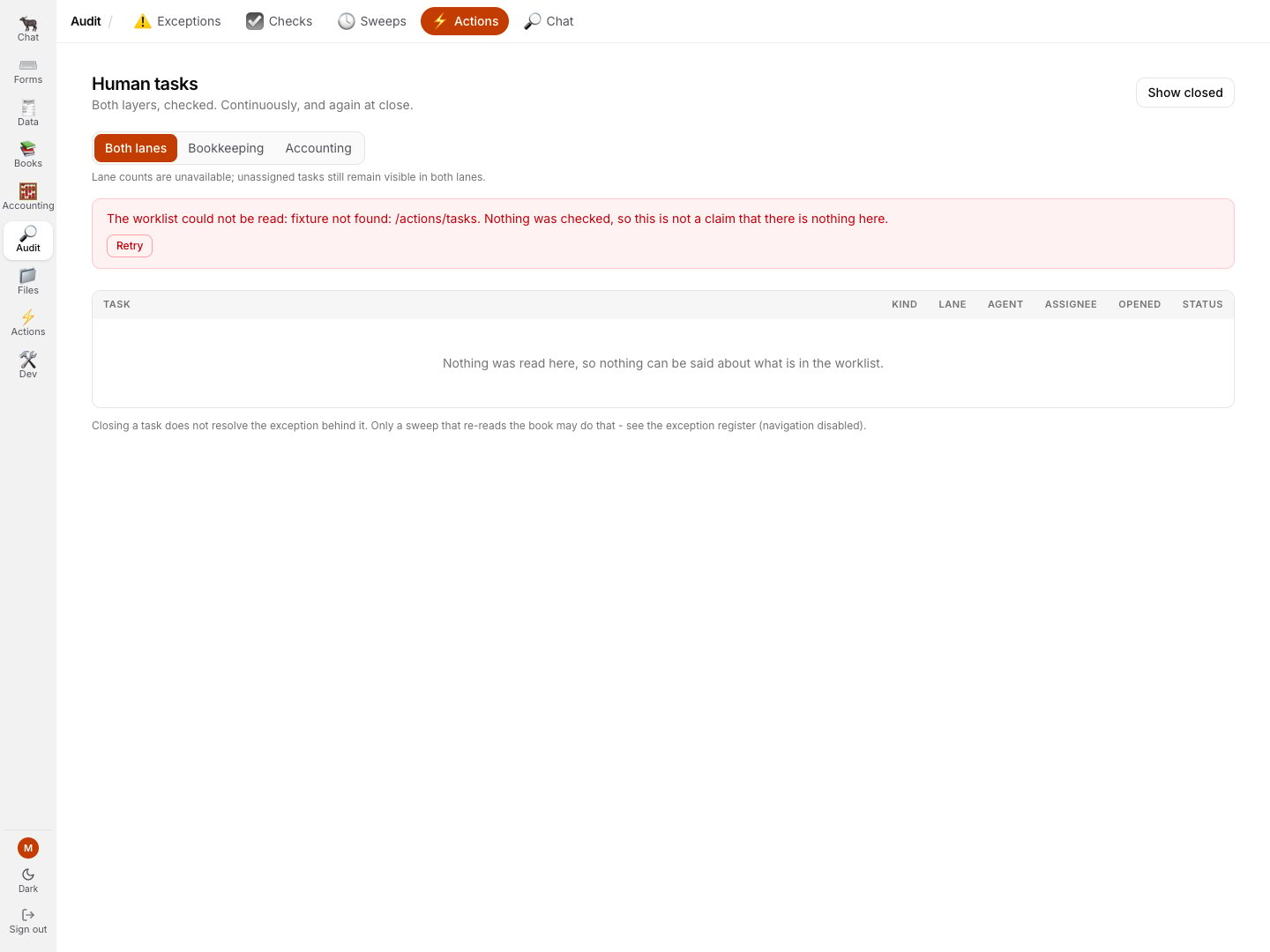 Pick your lane at the top: **Both lanes**, **Bookkeeping** or **Accounting**.
Each row carries the lane its finding carried, so a break in the matching layer and a break in the analytical layer never land on the same person by accident.
**Read the sentence above the table before you trust the lane counts.**
When open tasks have no lane recorded, the page states how many appear in **both** and marks each one **Both lanes · no lane recorded**.
That deliberate over-routing keeps an untagged task visible; the opposite default is how work disappears.
Set the row's status to **Done** when you have done the work.
Then read the line under the table:
> *"Closing a task does not resolve the exception behind it. Only a sweep that re-reads the book may do that."*
That is not a limitation, it is the point.
It is entirely legitimate for the work to be done while the finding stays open until tonight's sweep confirms it from the book.
Every change is stamped with who made it and when.
The other direction is automatic: when a sweep does resolve a finding, its task closes in the same breath and says why it vanished, so you never find yourself working a task for a problem that no longer exists.
## A worked example
A representative finding from the seeded assurance fixture, in full:
> **warning · Open · Bookkeeping · matching**
> **AP-FIX-1 supplier VAT invoice (Alpha)**
> AP-FIX-1 supplier VAT invoice (Alpha) (`supplier_vat_invoice`) is POSTED to the ledger and there is nothing behind it - no uploaded file, no document composed in the Typewriter and no record it was staged into. The entry is immutable, so the remedy is to attach the supporting document, not to correct the posting.
>
> CHECK Document completeness · `missing_evidence` · WHEN IT RUNS Not stated · SEEN 2 times · ON THE WORKLIST yes
What each part is telling you:
* **`missing_evidence`** is one of six completeness rules. **When it runs: not stated** because this rule has no clock at all: a posted document with nothing behind it is wrong the moment it exists, not wrong for getting old.
* **Bookkeeping · matching** means it lands in the bookkeeping lane. Somebody needs to find the file, not decide an allocation.
* **seen 2 times** is one row that has been re-sighted, not two alerts.
* **On the worklist: yes** means there is a task for it in the Bookkeeping lane of Actions.
* **There is no resolve button.** Attach the evidence, and tonight's sweep will resolve it for you.
## Related
* [Asking the Auditor](/greatbook/guides/audit-your-books) - the conversational half
* [The exception system](/greatbook/agents/assurance) - the same system, in full technical detail
* [Two layers on the same documents](/greatbook/two-layers) - what the lane on a finding means
* [The Close checksums](/greatbook/capabilities/close-list) - the 104 checks, by phase and by layer
* [Closing a period](/greatbook/guides/close-a-period) - where the close-gated half is asked
Pick your lane at the top: **Both lanes**, **Bookkeeping** or **Accounting**.
Each row carries the lane its finding carried, so a break in the matching layer and a break in the analytical layer never land on the same person by accident.
**Read the sentence above the table before you trust the lane counts.**
When open tasks have no lane recorded, the page states how many appear in **both** and marks each one **Both lanes · no lane recorded**.
That deliberate over-routing keeps an untagged task visible; the opposite default is how work disappears.
Set the row's status to **Done** when you have done the work.
Then read the line under the table:
> *"Closing a task does not resolve the exception behind it. Only a sweep that re-reads the book may do that."*
That is not a limitation, it is the point.
It is entirely legitimate for the work to be done while the finding stays open until tonight's sweep confirms it from the book.
Every change is stamped with who made it and when.
The other direction is automatic: when a sweep does resolve a finding, its task closes in the same breath and says why it vanished, so you never find yourself working a task for a problem that no longer exists.
## A worked example
A representative finding from the seeded assurance fixture, in full:
> **warning · Open · Bookkeeping · matching**
> **AP-FIX-1 supplier VAT invoice (Alpha)**
> AP-FIX-1 supplier VAT invoice (Alpha) (`supplier_vat_invoice`) is POSTED to the ledger and there is nothing behind it - no uploaded file, no document composed in the Typewriter and no record it was staged into. The entry is immutable, so the remedy is to attach the supporting document, not to correct the posting.
>
> CHECK Document completeness · `missing_evidence` · WHEN IT RUNS Not stated · SEEN 2 times · ON THE WORKLIST yes
What each part is telling you:
* **`missing_evidence`** is one of six completeness rules. **When it runs: not stated** because this rule has no clock at all: a posted document with nothing behind it is wrong the moment it exists, not wrong for getting old.
* **Bookkeeping · matching** means it lands in the bookkeeping lane. Somebody needs to find the file, not decide an allocation.
* **seen 2 times** is one row that has been re-sighted, not two alerts.
* **On the worklist: yes** means there is a task for it in the Bookkeeping lane of Actions.
* **There is no resolve button.** Attach the evidence, and tonight's sweep will resolve it for you.
## Related
* [Asking the Auditor](/greatbook/guides/audit-your-books) - the conversational half
* [The exception system](/greatbook/agents/assurance) - the same system, in full technical detail
* [Two layers on the same documents](/greatbook/two-layers) - what the lane on a finding means
* [The Close checksums](/greatbook/capabilities/close-list) - the 104 checks, by phase and by layer
* [Closing a period](/greatbook/guides/close-a-period) - where the close-gated half is asked