> ## Documentation Index
> Fetch the complete documentation index at: https://docs.vinmake.com/llms.txt
> Use this file to discover all available pages before exploring further.
# Agent workspaces
> Opening an agent gives you its own workspace: Chat, Upload, and the Operation staging grid, with one sub-nav per agent.
# Agent workspaces
Picking an agent does not just open a chat box.
It opens **that agent's workspace**, a screen scoped to the one thing that agent does, with its own
sub-nav across the top and an **All agents & apps** link back to the landing.
The rail on the far left never moves while you are in one, and it highlights where you are: the two
desks you use daily have their own rail entries, **Data** for the bookkeeping layer, where the
Clerk works, and **Audit** for assurance across both layers, where the Auditor works.
Those two names are [the two layers](/greatbook/two-layers), not two piles of paperwork.
## The sub-nav is per agent
Each agent exposes only the surfaces it actually has.
| Agent | Tabs | Why |
| ------------------------------ | ------------------------- | ----------------------------------------------------------------------------------------------------------------------------------------------------------------------------- |
| **Clerk** | Chat · Upload · Operation | it is the intake lane, so it owns both the way documents arrive and the staging grid they arrive from |
| **Typewriter** | Chat | composing happens in the form builder, which is **Forms** in the rail |
| **Auditor** | Chat | it only reads and recomputes, so it has nothing to stage and nothing to upload. Its **exceptions and sweeps** live in the **Audit** workspace rather than in the conversation |
| **Bookkeeper**, **Accountant** | none | `Live · in pipeline`: they work the queue rather than a conversation, and the Bookkeeper's card links to the review inbox instead |
The Bookkeeper is absent from the picker on purpose.
An agent that drafts journal entries and stops is not something you should be able to talk into a
different draft, and that is
[the whole reason it has no chat surface](/greatbook/agents/bookkeeper).
## Chat
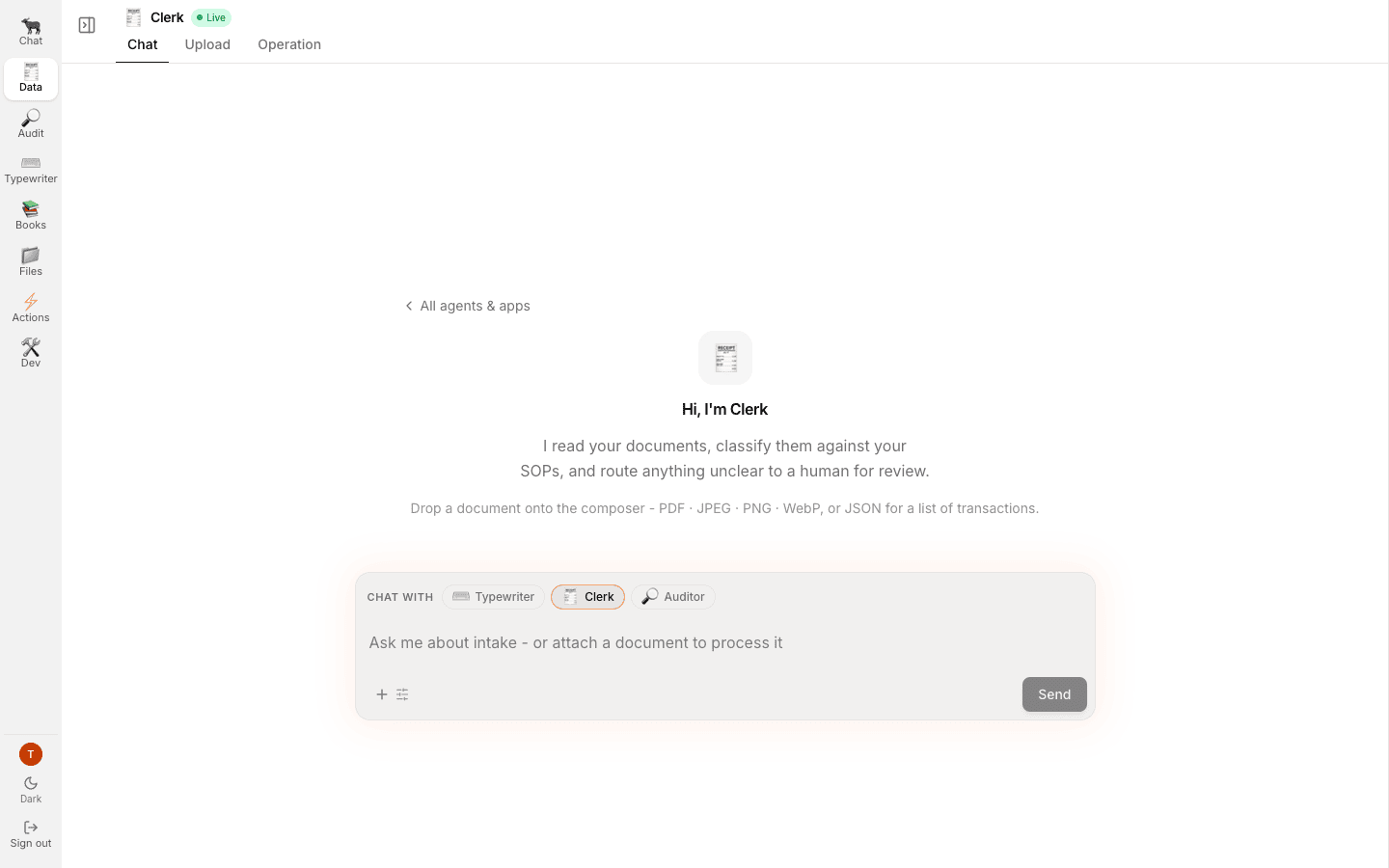
The Chat tab is the conversation, and each agent opens with its own scope stated in the first person -
what it does, and what it will not do.
Under the greeting sits the composer, carrying the same **Chat with** picker as the landing.
Switching agent there starts a **fresh conversation** rather than retargeting the one you are in,
because a thread belongs to one agent for its whole life.
 ## Upload: the Clerk's desk
This is the front door for documents that arrive rather than being composed, and it is the surface
the [upload lane guide](/greatbook/guides/upload-a-document) walks.
There are two drop zones, and the distinction between them is the important part.
| Zone | Accepts | What it means |
| -------------------------- | ------------------------------------ | ------------------------------------------------------------------------------------- |
| **A document** | PDF · JPEG · PNG · WebP, up to 25 MB | one file, **one record**. The Clerk reads it, classifies it and stages one intake row |
| **A list of transactions** | JSON only, up to 5,000 rows | **each row becomes a record**. One drop, many intake rows |
**Typing the contents of a document into the chat does not start an intake.**
The page says so itself.
An intake row exists because a file was put on the Clerk's desk; pasted text is a conversation, not a
document of record.
A spreadsheet is stored in **Files** but not parsed.
Export it as JSON for the list lane, or hand it to the **Typewriter**, which is the component whose
job is turning a list into schema-valid JSON.
## Upload: the Clerk's desk
This is the front door for documents that arrive rather than being composed, and it is the surface
the [upload lane guide](/greatbook/guides/upload-a-document) walks.
There are two drop zones, and the distinction between them is the important part.
| Zone | Accepts | What it means |
| -------------------------- | ------------------------------------ | ------------------------------------------------------------------------------------- |
| **A document** | PDF · JPEG · PNG · WebP, up to 25 MB | one file, **one record**. The Clerk reads it, classifies it and stages one intake row |
| **A list of transactions** | JSON only, up to 5,000 rows | **each row becomes a record**. One drop, many intake rows |
**Typing the contents of a document into the chat does not start an intake.**
The page says so itself.
An intake row exists because a file was put on the Clerk's desk; pasted text is a conversation, not a
document of record.
A spreadsheet is stored in **Files** but not parsed.
Export it as JSON for the list lane, or hand it to the **Typewriter**, which is the component whose
job is turning a list into schema-valid JSON.
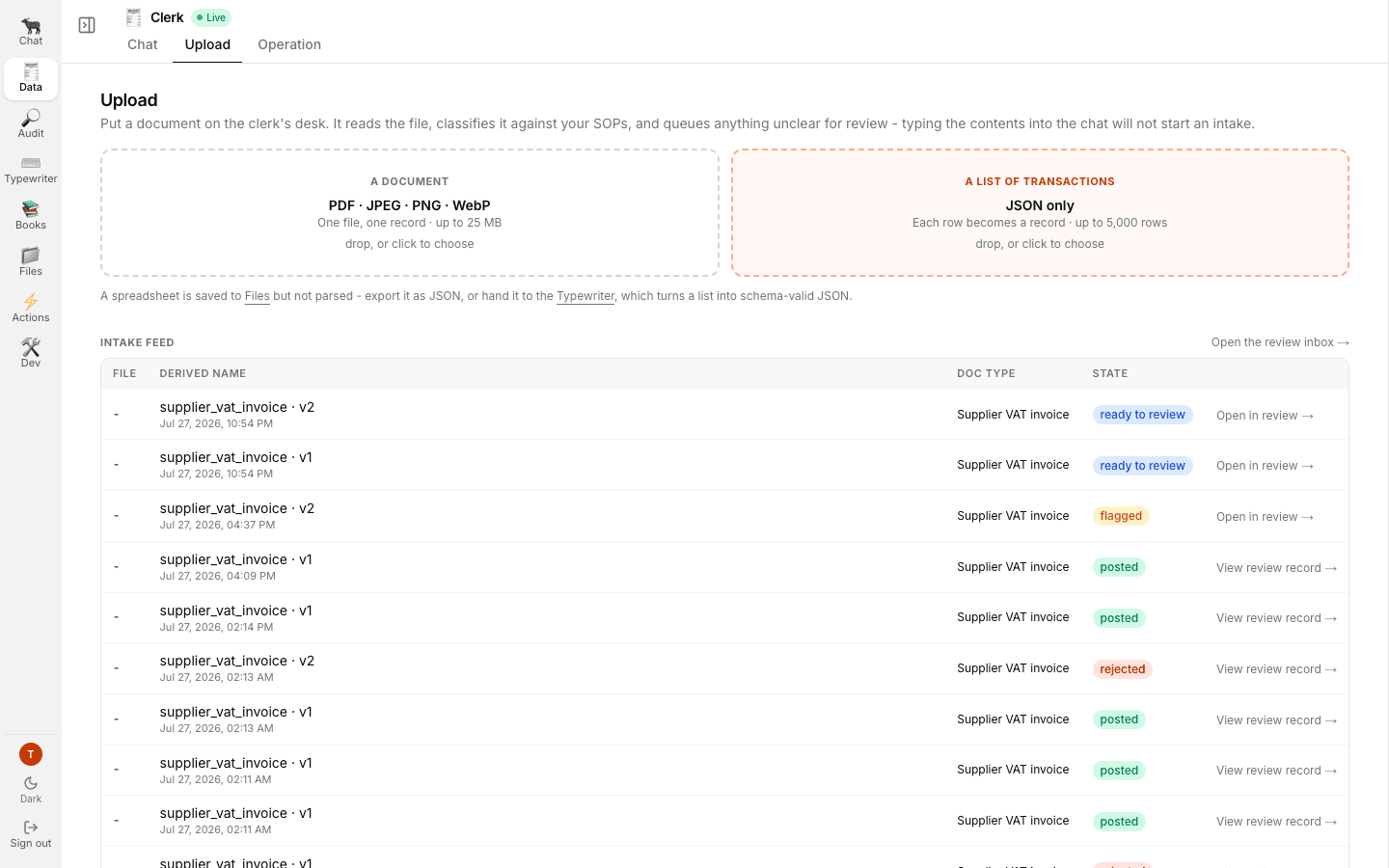 Below the drop zones, the **intake feed** shows what has landed: the file, the derived name, the doc
type the Clerk decided on, and the state it left the row at.
The link at the end of each row tells you whether there is anything left to do.
**Open in review →** means the row is still actionable - *ready to review* or *flagged*.
**View review record →** means it is finished, posted or rejected, and you are looking at history.
Either way it is the same row you would find in
[Books → Review](/greatbook/guides/review-inbox): the feed is a view onto the queue, not a second
queue.
## Operation: the staging grid
**Operation** embeds the Teable staging base: **52 tables, grouped by flow**.
| Group | What is in it |
| ---------------------------------- | --------------------------------------------------------------------------------------------------------------------------------------------------------------------------------------------------------------- |
| **Procure to pay** | Bill (AP) and bill lines, goods receipts, material buys, subcontract orders, payment and spending orders, payment allocations, reimbursements, the cash book, BOM lines, consumption norms, material plan lines |
| **Order to cash** | Invoice (AR) and invoice lines, receipts, receipt allocations, security deposits |
| **Order spine** | Orders, sample orders, quotations, contracts, leases, loan facilities |
| **Logistics and inventory** | Shipments, deliveries, inventory movements |
| **Payroll and HR** | Employment contracts, attendance, payroll runs, HR decisions |
| **Treasury, tax and intercompany** | Loan movements, tax filings, intercompany invoices |
| **Claims and adjustments** | Claim cases, AR write-offs, inventory adjustments, free-issue custody |
| **Equity and FX** | Equity transactions, FX revaluations |
| **Masters** | Entities, clients, suppliers, item SKUs, styles, materials, colorways, cost centres, bank accounts, price-list lines, employees, locations |
Below the drop zones, the **intake feed** shows what has landed: the file, the derived name, the doc
type the Clerk decided on, and the state it left the row at.
The link at the end of each row tells you whether there is anything left to do.
**Open in review →** means the row is still actionable - *ready to review* or *flagged*.
**View review record →** means it is finished, posted or rejected, and you are looking at history.
Either way it is the same row you would find in
[Books → Review](/greatbook/guides/review-inbox): the feed is a view onto the queue, not a second
queue.
## Operation: the staging grid
**Operation** embeds the Teable staging base: **52 tables, grouped by flow**.
| Group | What is in it |
| ---------------------------------- | --------------------------------------------------------------------------------------------------------------------------------------------------------------------------------------------------------------- |
| **Procure to pay** | Bill (AP) and bill lines, goods receipts, material buys, subcontract orders, payment and spending orders, payment allocations, reimbursements, the cash book, BOM lines, consumption norms, material plan lines |
| **Order to cash** | Invoice (AR) and invoice lines, receipts, receipt allocations, security deposits |
| **Order spine** | Orders, sample orders, quotations, contracts, leases, loan facilities |
| **Logistics and inventory** | Shipments, deliveries, inventory movements |
| **Payroll and HR** | Employment contracts, attendance, payroll runs, HR decisions |
| **Treasury, tax and intercompany** | Loan movements, tax filings, intercompany invoices |
| **Claims and adjustments** | Claim cases, AR write-offs, inventory adjustments, free-issue custody |
| **Equity and FX** | Equity transactions, FX revaluations |
| **Masters** | Entities, clients, suppliers, item SKUs, styles, materials, colorways, cost centres, bank accounts, price-list lines, employees, locations |
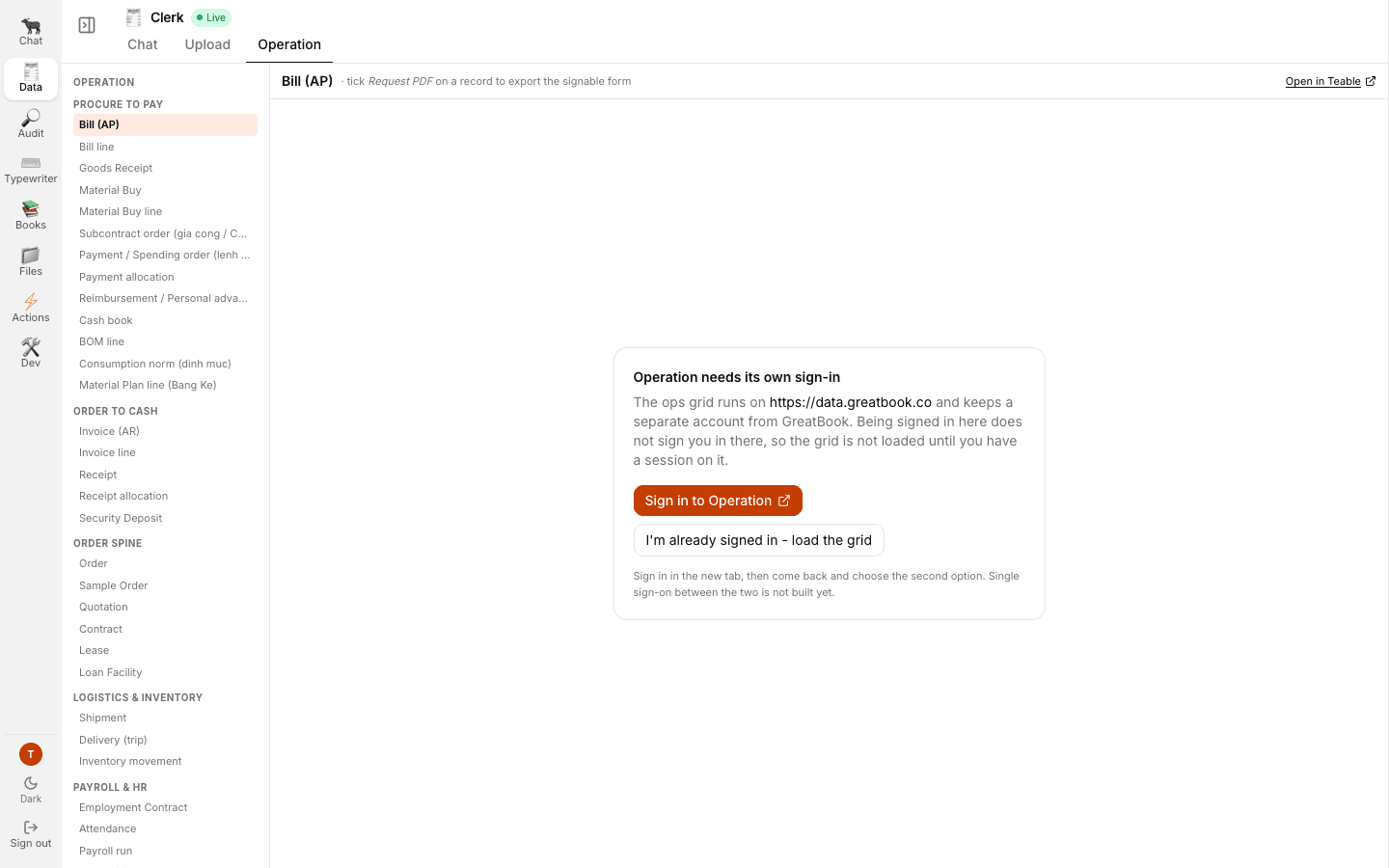 Ticking **Request PDF** on a record exports the signable form for it, which is how an operational
row becomes a document that can travel the golden path.
**Open in Teable ↗** takes you to the same base in Teable itself when you want the full grid.
The embedded grid is a **staging** area, and it is upstream of everything these guides describe.
Nothing in it is in your books.
A row becomes financial only by becoming a document and passing
[both gates](/greatbook/guides/golden-path); there is no path from a Teable cell to a journal entry.
**Operation needs its own sign-in, and the page says so rather than showing you an empty grid.**
The ops grid runs on `data.greatbook.co` and keeps a separate account from GreatBook, so being
signed in here does not sign you in there.
Use **Sign in to Operation ↗**, which opens a new tab, then come back and choose
**I'm already signed in - load the grid**.
Single sign-on between the two is not built yet.
## Related
* [Signing in and finding your way](/greatbook/guides/sign-in) - the landing these workspaces open from
* [The other lane: uploading a document](/greatbook/guides/upload-a-document) - the Upload tab, walked end to end
* [The agent org](/greatbook/agents/index) - what each of the five agents is allowed to do
Ticking **Request PDF** on a record exports the signable form for it, which is how an operational
row becomes a document that can travel the golden path.
**Open in Teable ↗** takes you to the same base in Teable itself when you want the full grid.
The embedded grid is a **staging** area, and it is upstream of everything these guides describe.
Nothing in it is in your books.
A row becomes financial only by becoming a document and passing
[both gates](/greatbook/guides/golden-path); there is no path from a Teable cell to a journal entry.
**Operation needs its own sign-in, and the page says so rather than showing you an empty grid.**
The ops grid runs on `data.greatbook.co` and keeps a separate account from GreatBook, so being
signed in here does not sign you in there.
Use **Sign in to Operation ↗**, which opens a new tab, then come back and choose
**I'm already signed in - load the grid**.
Single sign-on between the two is not built yet.
## Related
* [Signing in and finding your way](/greatbook/guides/sign-in) - the landing these workspaces open from
* [The other lane: uploading a document](/greatbook/guides/upload-a-document) - the Upload tab, walked end to end
* [The agent org](/greatbook/agents/index) - what each of the five agents is allowed to do